


L
Best Logic 11 controller
You can now edit any logic composition using this fantastically intuitive controller. It is well-designed, rugged and very reasonably priced. This is the most useful purchase I have ever made from Thomann.
12
0
Report
Ja
The best controller I've used, but still doesn't quite hit the mark.
Using Cubase 14.
I've used a lot of controllers to try and get that so called hands-on feel. Most have big flaws in the implementation and you end up reaching for the mouse or keyboard. Keyboards fine, but the mouse I want to avoid.
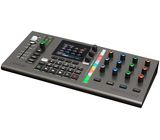
Anyway, out of the box this thing is plastic, but sturdy and solid. All of the buttons, knobs and fader work perfectly well and feel decent. It sits solidly on your desk and doesn't move around. So far so good.
In use for Cubase there are some things that are absolutely light years ahead of other controllers I've used. The integration with the channel strip and plugins is actually... USABLE! Amazing. Once your on a channel, you can absolutely forget looking at the screen and control almost everything about it. Wonderful... also some cool features like the programmable knobs you can use for example, changing clip gain of the selected track audio. So handy!
But wait, and this is the disappointing part. It sometimes loses track of what channel you select dragging you unceremoniously out of the experience and back to the 'pc world' so you can't rely on it and you end up adjusting settings for channels you don't intend to. I also regularly have to restart the unit in order for it to communicate with Cubase at all at the start of a session.
If they could only sort out these ridiculous flaws, it would be a masterpiece. And then please produce an expansion with 8 or 16 faders!
Another thing to bear in mind is that the colour of the backlit buttons. Its very difficult to see whether they are engaged or not as they only change slightly when you press them. That could be much better.
I've used a lot of controllers to try and get that so called hands-on feel. Most have big flaws in the implementation and you end up reaching for the mouse or keyboard. Keyboards fine, but the mouse I want to avoid.
Anyway, out of the box this thing is plastic, but sturdy and solid. All of the buttons, knobs and fader work perfectly well and feel decent. It sits solidly on your desk and doesn't move around. So far so good.
In use for Cubase there are some things that are absolutely light years ahead of other controllers I've used. The integration with the channel strip and plugins is actually... USABLE! Amazing. Once your on a channel, you can absolutely forget looking at the screen and control almost everything about it. Wonderful... also some cool features like the programmable knobs you can use for example, changing clip gain of the selected track audio. So handy!
But wait, and this is the disappointing part. It sometimes loses track of what channel you select dragging you unceremoniously out of the experience and back to the 'pc world' so you can't rely on it and you end up adjusting settings for channels you don't intend to. I also regularly have to restart the unit in order for it to communicate with Cubase at all at the start of a session.
If they could only sort out these ridiculous flaws, it would be a masterpiece. And then please produce an expansion with 8 or 16 faders!
Another thing to bear in mind is that the colour of the backlit buttons. Its very difficult to see whether they are engaged or not as they only change slightly when you press them. That could be much better.
2
0
Report
PC
Excellent integration with Cubase
Very good quality and deep integration with Cubase (at least with Cubase pro plugins). Although the mouse is still needed, it enables micro-adjustments on several functions (e.g. pan, volume, gain etc).
8
0
Report
IG
Great. 👍
I’ve tried many controllers. I’ll say it upfront — this one isn’t perfect. The plastic, the fader, and so on. Having worked for over a year with SSL controllers (at work), I can say those are better. However, no other controller comes close in terms of DAW integration depth. I work 80% of the time in Cubase and 20% in Logic, and I can confidently say this controller fits better than anything else currently on the market. It will definitely earn a permanent spot in my home studio.
4
0
Report
r
Excelent Logic Pro Controller
This little unit has a still a lot of potential. Right now is very stable and is running perfectly after 1.5 years in the studio. It's not a 100% intuitive unit so reading the manual might greatly increase it's usefulness. Also, it's essential to learn how to manually assign plugin parameters. That can be done directly on the hardware unit most of the time, but using Nektarine software greatly expands it's capacities.
1
0
Report
b
Needs V2
This is a well thought out product, that might be trying to do too much at once, housed in substandard body.
It works well in Logic and Fender StudioPro. Two most useful features are transport control, especially the marker buttons, and ability to open exact plugin slot. For people who do the ProTool-style plugin ordering in Logic it's great to directly open the EQ plugin that's always in slot 1 directly with a button click.
Plugin control, for stock plugins, is a hit and miss. If you spend time with it and learn the mapping it might save you some time, but I am not too bothered by it.
Single fader is of decent quality and works well, importantly it is not as loud and clacky like some other controllers on the market. It's quite gentle and doesn't rattle.
The biggest gripe is the quality of the buttons - they are rubbery, squishy, with no defined centre of pressure and difficult to work with. This product needs to take inspiraton from Elektron for their V2 buttons (and have mechanical switches with firm press and footing so repeated usage for transport control is not so annoying).
It works well in Logic and Fender StudioPro. Two most useful features are transport control, especially the marker buttons, and ability to open exact plugin slot. For people who do the ProTool-style plugin ordering in Logic it's great to directly open the EQ plugin that's always in slot 1 directly with a button click.
Plugin control, for stock plugins, is a hit and miss. If you spend time with it and learn the mapping it might save you some time, but I am not too bothered by it.
Single fader is of decent quality and works well, importantly it is not as loud and clacky like some other controllers on the market. It's quite gentle and doesn't rattle.
The biggest gripe is the quality of the buttons - they are rubbery, squishy, with no defined centre of pressure and difficult to work with. This product needs to take inspiraton from Elektron for their V2 buttons (and have mechanical switches with firm press and footing so repeated usage for transport control is not so annoying).
0
0
Report
L
One of the best
This is one of the best controllers you can buy for Logic (at least this is the DAW that I'm using) and it is not even expensive. It has allot of functions and utilities. The learning curve on some features might be longer but once you know how is done, it will be of great help.
The only thing I would like to have is an addition of a fader-port with at least 8 channels, but even with the only one it has you can manage. Very good automated touch sensitive fader and infinite turning knobs. All the controls are responsive and the build quality overall gives you the feeling of a much more expensive device.
In the meanwhile I bought another controller, only for the plugins - and although it has a much bigger price (2x+) I ended up continuing to use the CS12 for the plugin controls as well.
You won't go wrong with this one!
The only thing I would like to have is an addition of a fader-port with at least 8 channels, but even with the only one it has you can manage. Very good automated touch sensitive fader and infinite turning knobs. All the controls are responsive and the build quality overall gives you the feeling of a much more expensive device.
In the meanwhile I bought another controller, only for the plugins - and although it has a much bigger price (2x+) I ended up continuing to use the CS12 for the plugin controls as well.
You won't go wrong with this one!
0
0
Report
_s
Perfect for Cubase
I'm really happy with this addition to my setup.
The script for cubase works really well. It's fairly simple to use.
The script for cubase works really well. It's fairly simple to use.
0
0
Report
R
Good bit of kit.
Nice design, well made. I was hoping this would suit my needs, however, although it is comprehensive in its functionality within logic the layout and the on board displays do not work for me. It’s a good bit of kit, just doesn’t suit me!
0
0
Report
H
Happy Client
The best investment ever for my mixing
0
0
Report